
Service Autopilot Review: What We Actually Use After 10 Years
We’ve used Service Autopilot to help run our contracting business since 2016.
Ten years later, we still use it every working day.
Here’s the interesting part: we probably don’t use 95% of what Service Autopilot can do.
We don’t use it for estimating. We don’t invoice through it. We don’t use it for most of our customer emails, accounting or marketing. We use other software for several of those functions.
What we do use Service Autopilot for is extremely important to our operation: scheduling recurring work, building routes, dispatching our crew, tracking job time, recording drive time, and keeping field notes and photos attached to customers.
And for those jobs, it has worked well enough that after 10 years we’ve never found a compelling reason to leave.
Our Service Autopilot Setup
- Started using it: 2016
- Current subscription: Starter Unlimited
- Users: 1 office/desktop user and 1 mobile user
- Current cost: Approximately $100 per month
- Recurring properties managed: Approximately 65
- Primary uses: Scheduling, routing, dispatching, time tracking, customer notes and field photos
Our subscription is an existing account configuration and should not be confused with Service Autopilot’s currently advertised plans or pricing for new customers.
What We Actually Use Service Autopilot For
Service Autopilot can do far more than what we ask it to do.
The software includes features related to CRM, estimates, invoicing, payments, marketing, reporting, job costing, customer management and other parts of a service business.
We don’t try to run our entire company through one piece of software.
Instead, Service Autopilot has become our operational system for our recurring service route.
We currently manage approximately 65 recurring properties through it with one field crew.
Our main uses are:
- Master routes
- Recurring jobs
- Seasonal jobs
- Daily route scheduling
- Dispatching
- Employee job-time tracking
- Drive-time tracking
- Lunch and break tracking
- Customer/job notes
- Photos from the field
For a small operation like ours, that’s enough to make the software valuable.
What a Normal Morning Looks Like for Us
This is probably the easiest way to explain why we’ve kept Service Autopilot for so long.
Every morning, we open the schedule on the computer and look over the day’s route.
Most of the work is already there because our recurring routes have been built in advance.
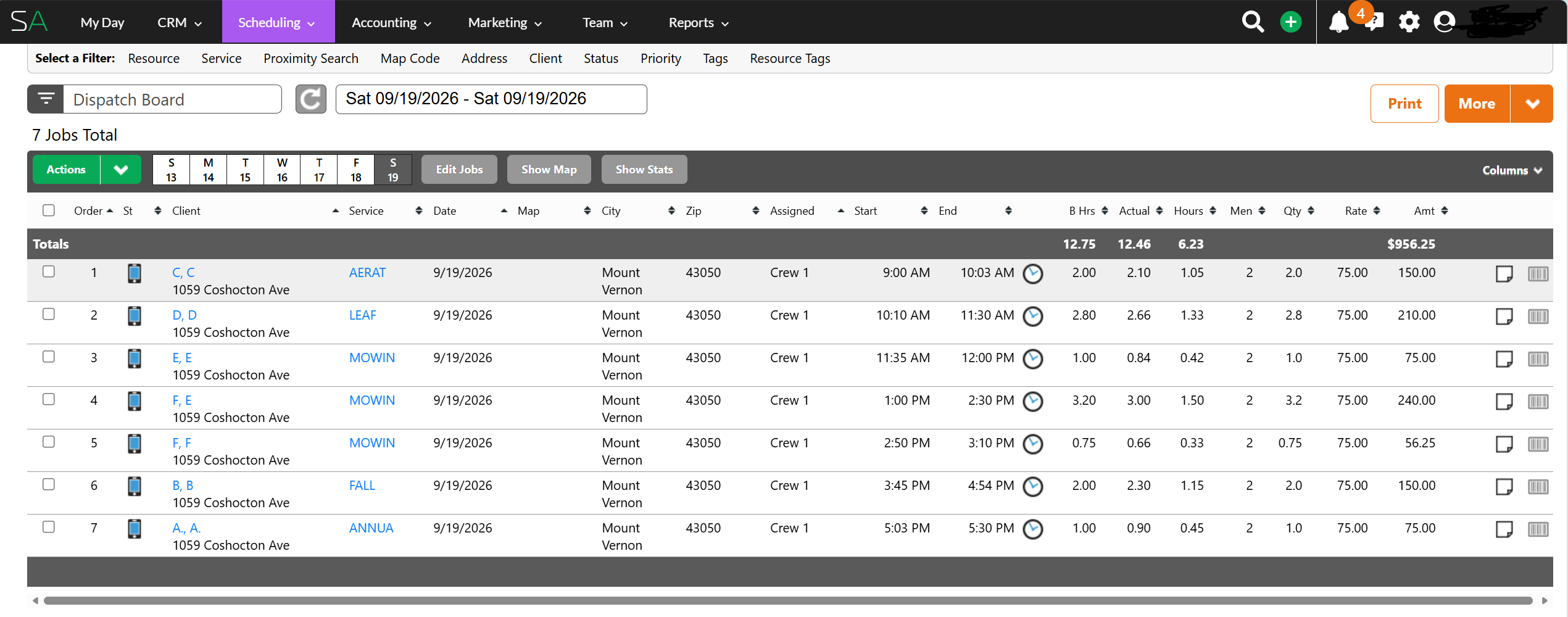
We check the order, make sure everything looks right, add any new property or one-time job that needs to be included, and then dispatch the route.
We can dispatch the entire route at once.
If we need to change the order, we switch to manual routing and drag a property into the position where we want it.
Depending on the situation, we can make the change for today’s route or update the recurring route so the property stays in that position going forward.
Our Basic Daily Workflow
Open Route → Review Order → Add New Work → Make Adjustments → Dispatch → Crew Runs Route → Review Actual Time
That’s basically it.
For something we use almost every working day, that’s exactly what I want: a system that doesn’t require much thought once it’s set up.
The Field Side Is Extremely Easy to Use
This may be my favorite part of Service Autopilot.
Our crew uses a company-issued iPad in the field. The basic workflow is simple enough that there isn’t much training involved.
They can start a job, stop a job, record drive time, start and stop lunch, skip a property when necessary, add a note, and attach a photo to a customer’s record.
The interface for the field crew is simple.
That’s important.
Field software can have every feature imaginable, but if employees don’t consistently use it correctly, the data isn’t worth much.
Service Autopilot has made the basic field workflow easy enough that our crew actually uses it.
The Time Tracking Is One of the Most Valuable Features for Us
I couldn’t imagine going back to running our recurring route without job-level time tracking.
Service Autopilot doesn’t just tell us how long the crew was physically at a property. It also helps us understand the labor consumed by that visit.
For example, suppose three employees are clocked into a property for 20 minutes.
The visit took:
Elapsed job time: 20 minutes
Total labor consumed: 60 man-minutes
That distinction matters when you’re trying to determine whether a recurring property is actually priced correctly.
A job may look fast on the schedule, but what matters financially is the total labor being consumed.
This is also why understanding your labor cost matters. Once you know what a productive labor hour actually costs your company, job-time data becomes much more useful.
Recurring Routes Are Where Service Autopilot Really Helps Us
If we had to manually enter approximately 65 recurring properties every week, the software wouldn’t be saving us much time.
The value comes from building the recurring schedule ahead of time.
We have weekly work, biweekly work and other recurring schedules set up so we don’t have to recreate the route every morning.
This was one of the areas where the training videos were especially helpful when we first started using Service Autopilot in 2016.
The basic software is intuitive, but setting up master schedules and recurring routes correctly takes a little more understanding.
Once they’re built, though, the daily process becomes much easier.
Route Changes Are Easy
Another feature I like is how easy it is to rearrange a route.
If a property needs to move, we can drag and drop it into a different position.
That sounds minor until you manage recurring field-service routes every week.
Weather, customer requests, crew availability, new customers and other circumstances can change the most efficient order during the day.
My wife normally handles our routing from the office, but if I’m away from the computer and something changes, I can make many of those adjustments myself from my phone.
That brings me to my biggest complaint.
My Biggest Complaint: Office-Level Work on a Phone Can Be Frustrating
Service Autopilot has mobile functionality, and our field user works from a mobile device without a problem.
My frustration is different.
When I’m away from the office and trying to perform some of the same administrative tasks I would normally perform on a desktop, the experience can be awkward.
Basic route adjustments are manageable. More detailed administrative work can be annoying.
For example, when adding a customer or service from my phone, I’ve encountered windows where the fields don’t fit the screen particularly well. Sometimes the information I need is off to the side, but trying to move over to it moves the window rather than exposing what I need.
I’ve experienced something similar when selecting services from longer dropdown lists. I may be able to see the last several letters of an option but not enough of the beginning to easily distinguish between similarly named services.
None of this is enough to make us change software.
But after using Service Autopilot for 10 years, a smoother experience for office-level administrative work from a phone is the improvement I would personally appreciate most.
Service Autopilot’s current plan information describes its business users as having web/mobile office access. The comments above describe our own experience with specific administrative tasks from a phone, not a claim that office users have no mobile access.
One Historical Frustration With Recurring Jobs
Another annoyance we’ve dealt with historically involved recurring schedules.
In our earlier experience with Service Autopilot, recurring jobs had to be rebuilt as we moved into a new scheduling period rather than simply continuing forever until canceled.
That was frustrating because recurring work is exactly the type of work I want software to handle indefinitely once I’ve set it up correctly.
Service Autopilot has continued changing its scheduling system over the years, and its current documentation supports weekly, biweekly and other recurring schedules.
I haven’t verified whether the specific limitation we encountered years ago still works exactly the same way today. So I wouldn’t consider this a current complaint without checking your particular version and account setup.
We Don’t Use Service Autopilot for Estimating or Invoicing
This is an important part of our review because it shows how differently two contractors can use the same software.
Service Autopilot offers estimating, invoicing, accounting-related tools, customer management, reporting, marketing features and other capabilities.
We don’t use most of them.
We use QuickBooks Online for our estimates, invoices and much of our financial workflow.
That system already works for us, so we’ve never seen a reason to move those functions into Service Autopilot just because they’re available.
You Don’t Have to Use Every Feature
One lesson from our experience is that software doesn’t have to run every part of your business to be valuable. We probably ignore the majority of Service Autopilot’s capabilities. The relatively small portion we use solves an important enough problem that we’ve continued paying for it for 10 years.
What We Pay for Service Autopilot
We currently pay approximately $100 per month for our existing Starter Unlimited subscription with one office/desktop user and one mobile user.
At one point, our bill had climbed to approximately $220 per month.
When we looked more closely at the account, we realized we were paying for an additional mobile user we no longer needed and features we weren’t really using.
We reduced the account to what our business actually needed and brought the cost back down to approximately $100 per month.
I think there’s a useful lesson there regardless of which software you use:
Review your software subscriptions periodically.
Businesses change. Employees change. Features that once seemed useful stop getting used. It’s easy to keep paying for things because nobody goes back and looks at the bill.
Current Service Autopilot Pricing
Our $100 monthly cost is not the same thing as Service Autopilot’s currently advertised pricing for a new customer.
As of September 2026, Service Autopilot publicly lists the following plan prices based on annual subscription rates:
| Plan | Advertised Price |
|---|---|
| Startup | $49/month + sign-up fee |
| Pro | $199/month + sign-up fee |
| Pro Plus | $499/month + sign-up fee |
| Elite | Contact Service Autopilot for pricing |
Pricing and plan features can change. Check Service Autopilot directly for current pricing before making a purchasing decision.
We Almost Switched to Jobber
At one point, we seriously considered switching from Service Autopilot to Jobber.
We even started a free trial.
Jobber looked good, and I know contractors who like it.
But during the setup process, we realized something: we were about to spend a lot of time rebuilding our system and learning new software to solve a problem we didn’t really have.
We never canceled Service Autopilot.
Once we reduced our Service Autopilot subscription to approximately $100 per month, there was even less reason to make the change.
Our attitude became pretty simple:
If It Isn’t Broken, Don’t Fix It
We already knew the software. Our recurring routes were built. Our crew knew how to use it. It did what we needed it to do. Switching simply for the sake of switching didn’t make much business sense.
Service Autopilot Has Far More Features Than We Need
Our account screens are a reminder of just how broad the software has become.
Depending on the plan and additional services, Service Autopilot offers capabilities involving scheduling, CRM, invoicing, payments, estimates, reporting, job costing, marketing, client portals, maps, integrations, automations and more.
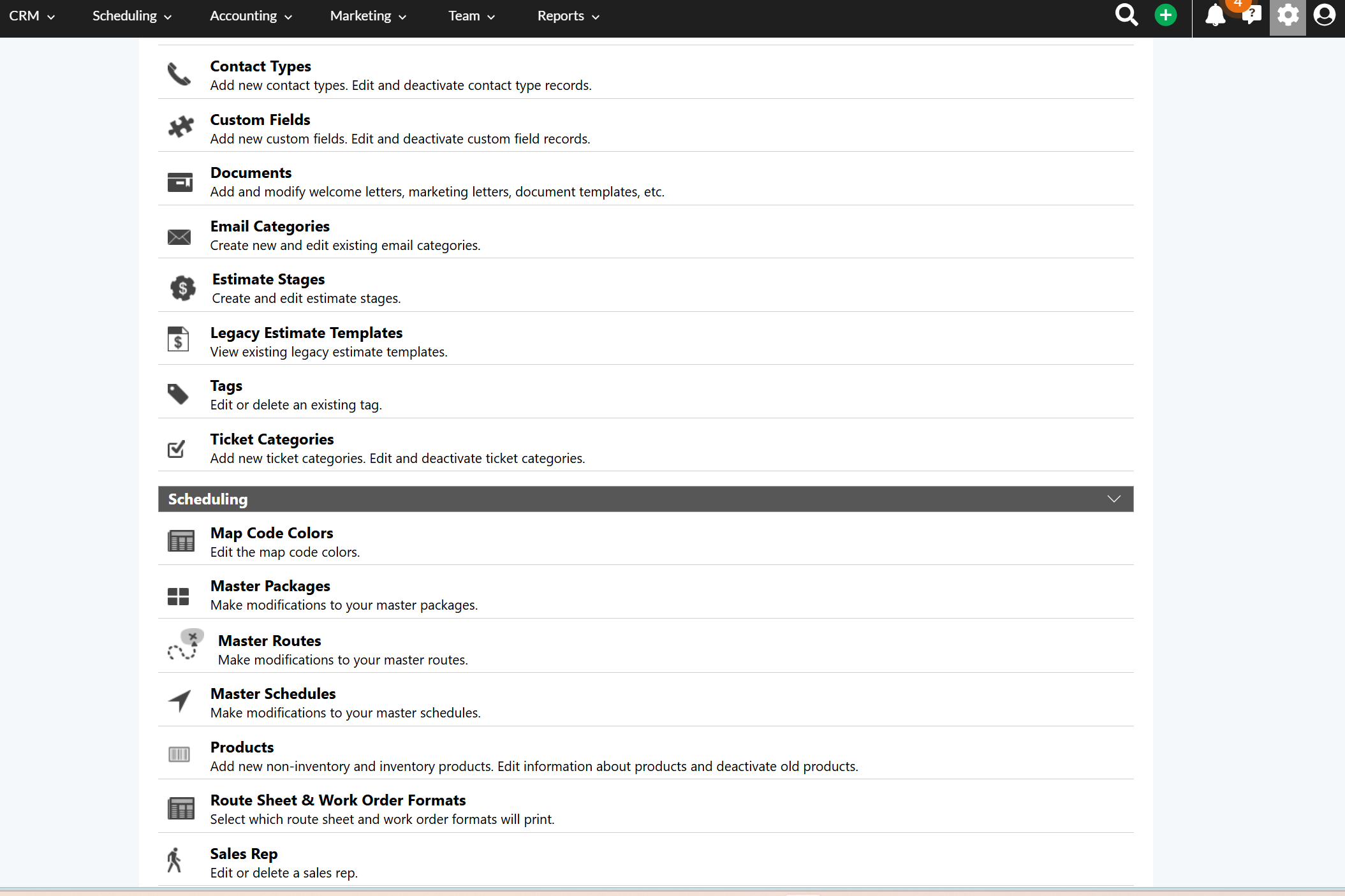
We’re a good example of why a contractor shouldn’t automatically assume they need every available feature.
We have one recurring service crew.
What matters most to us is getting the right properties onto the right route, dispatching them quickly, making the system easy for the crew to use, and getting reliable job-time information back from the field.
Service Autopilot does that for us.
What About Customer Support?
Our experience with Service Autopilot’s support has been good.
They provide training resources and assistance when customers need help.
We watched several of their tutorials when we originally set the system up, particularly when learning how to build the master and recurring schedules.
Those were helpful.
After the initial learning period, we haven’t needed much support because the portions of the system we use every day are fairly intuitive.
To me, that’s a positive. Good support is important, but software is even better when I don’t need to contact support very often.
Who Do I Think Service Autopilot Is For?
I don’t think Service Autopilot is only for large service businesses.
We’ve gotten plenty of value from it while operating a relatively small recurring route with one crew.
At the same time, the broader feature set gives larger companies substantially more room to build processes around scheduling, reporting, customer management, job costing, marketing and automation.
The more important question is whether your company has an operational problem that the software can solve.
If you’re trying to manage recurring customers from a notebook, spreadsheet, text messages or memory, scheduling software can become valuable long before you have a huge company.
Would We Choose Service Autopilot Again?
Yes.
Not because it’s perfect and not because we use everything it offers.
We’d choose it again because it has reliably handled an important part of our operation for approximately 10 years.
Our recurring routes stay organized. We can adjust and dispatch work quickly. Our crew can operate the field side without complicated training. We know how long jobs actually take. Notes and photos can stay attached to customer records. And the system has become part of our normal daily routine.
The fact that we’ve considered another platform and still stayed with Service Autopilot probably says more than a feature checklist could.
Our Service Autopilot Review After 10 Years
What we like most: Easy recurring scheduling and routing, simple field use, useful job-time tracking, drag-and-drop route changes, notes/photos and a relatively short learning curve for everyday functions.
Our biggest complaint: Performing some office/master-user administrative tasks from a phone can be awkward.
What we don’t use: Most of the estimating, invoicing, accounting, email, marketing and advanced features.
Would we buy it again? Yes. After using it since 2016, it still does the jobs we need it to do.
Biggest lesson: Don’t choose business software based on the longest feature list. Choose it based on whether it solves the operational problems your company actually has.
Frequently Asked Questions
Is Service Autopilot good for a small business?
It has worked well for our small operation. We currently use it to manage approximately 65 recurring properties with one field crew. We don’t use most of its advanced capabilities, but scheduling, routing, dispatching and time tracking are valuable enough for us to continue using it.
How much does Service Autopilot cost?
We currently pay approximately $100 per month under our existing account configuration. That is not the current advertised new-customer price. As of September 2026, Service Autopilot publicly lists Startup at $49 per month, Pro at $199 per month, Pro Plus at $499 per month, and Elite with custom pricing, based on annual subscription rates. Pricing can change, so check Service Autopilot for current information.
Does Service Autopilot track employee time?
Yes. Time tracking is one of the features we use most. Our field crew can record job time, drive time and lunch, and we can review how much labor was consumed by individual properties.
Can Service Autopilot schedule recurring jobs?
Yes. Recurring scheduling is one of the main reasons we use it. Our weekly, biweekly and other recurring work can be built into the schedule rather than manually entered every day.
Do you use Service Autopilot for invoicing and estimates?
No. Although Service Autopilot offers those capabilities, our company uses QuickBooks Online for estimates and invoicing. We primarily use Service Autopilot for field operations and recurring-route management.
Is Service Autopilot better than Jobber?
We can’t make a comprehensive comparison because we have not operated our company on Jobber long-term. We tried Jobber during a free trial and liked what we saw, but ultimately decided there wasn’t enough reason to rebuild a system that was already working for us in Service Autopilot.
Is Service Autopilot difficult to learn?
The everyday functions we use are fairly intuitive. Setting up master schedules and recurring work required more learning when we first started, and Service Autopilot’s training materials helped us understand that process. Once our routes were established, the daily workflow became straightforward.
Looking for Payroll Software Too?
After using QuickBooks Payroll for about nine years, we recently switched our small contracting business to Patriot Payroll. I wrote a separate review explaining why we switched, what the setup was like, and what we’ve learned from actually running payroll with it.
Put the Numbers to Work
Software can tell you how long a crew spent on a job. Knowing what those labor hours actually cost is what turns that information into better business decisions.
Explore Free Contractor Calculators →