
Patriot Payroll Review: Why We Switched After 9 Years With QuickBooks Payroll
Affiliate Disclosure: This article contains affiliate links. If you sign up for Patriot Software through one of our links, The Common Contractor may earn a commission at no additional cost to you. Our opinions are based on our firsthand experience using the software.
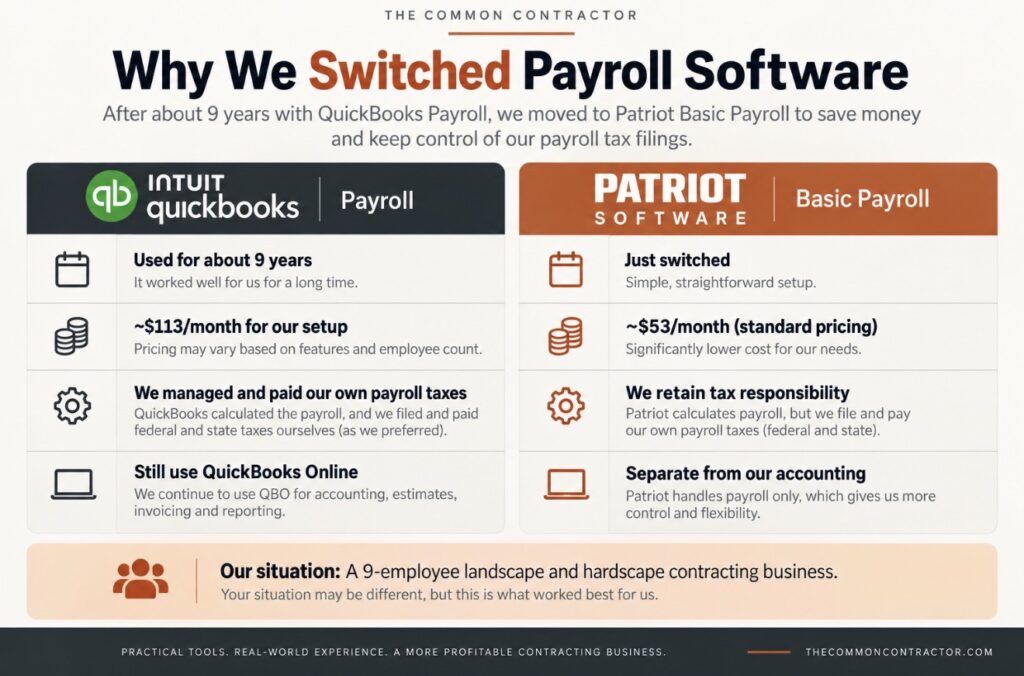
For about nine years, our contracting company used QuickBooks Payroll.
And for the most part, it worked well.
QuickBooks calculated our employee withholdings, overtime, vacation time and payroll totals. We would run payroll, handwrite our employees’ checks, and then use the payroll reports to handle our federal and state payroll tax payments ourselves.
It was a system we had used for years, and we weren’t really looking to change it.
Then QuickBooks changed how payroll taxes were handled.
That change ultimately led us to Patriot Software.
We’re now in the process of running our very first payroll through Patriot, so this isn’t a long-term review. It’s our experience choosing Patriot, setting it up and transitioning a real nine-employee contracting company from QuickBooks Payroll to Patriot Basic Payroll.
So far, there is a lot we like.
Why We Left QuickBooks Payroll After About 9 Years
First, we didn’t leave QuickBooks Online.
We still actively use QuickBooks Online for estimates, invoices, bookkeeping, bank reconciliation, financial reports and other accounting functions. Our accountant also has access to our QuickBooks information and uses those records when preparing our quarterly filings and tax returns.
For our company, QuickBooks remains an important piece of software.
It was QuickBooks Payroll that we decided to replace.
For years, we handled payroll taxes ourselves.
Our process was pretty simple:
- Run payroll through QuickBooks.
- Let QuickBooks calculate the appropriate withholdings, overtime, vacation time and other payroll amounts.
- Handwrite our employees’ checks.
- Use the payroll reports to determine our payroll tax liabilities.
- File and pay our federal and North Carolina payroll taxes ourselves through the appropriate government systems.
We have only nine employees, and we’ve been doing this for years.
Handling the tax-payment portion ourselves takes me roughly 20 minutes.
So we weren’t particularly interested in paying someone else to take over a process that was already working for us.
When QuickBooks changed its payroll system so that it would automatically handle payroll tax payments and filings, that no longer fit the way we wanted to operate.
We started looking for an alternative.
What We Wanted From Payroll Software
Our requirements weren’t complicated.
We wanted payroll software that would calculate everything for us — wages, withholding, overtime and the other payroll numbers — and give us good payroll records and reports.
Then we wanted to take it from there.
In other words:
We wanted software to help us run payroll. We didn’t necessarily want a company to take over payroll.
That distinction became one of the biggest factors in our search.
There are plenty of small-business owners who would rather have a payroll provider handle the tax filings and payments. I completely understand why.
As our company gets larger, we may eventually decide that our time is better spent elsewhere too.
But with nine employees and an established system for handling the taxes ourselves, we aren’t there yet.
Why We Chose Patriot Basic Payroll
Patriot offers two primary payroll options: Basic Payroll and Full Service Payroll.
Full Service Payroll includes federal, state and local payroll tax filings and deposits.
Basic Payroll does not. The business handles those responsibilities itself.
And that’s precisely what we were looking for.
With Patriot Basic Payroll, we’re essentially dividing the responsibilities this way:
Patriot handles: payroll calculations, employee deductions and withholding calculations, payroll records, reports and paystubs.
We handle: actually paying our employees and filing/paying our payroll taxes.
For our particular company, that’s a good fit.
Interested in Trying Patriot Payroll?
We switched after nine years with QuickBooks Payroll and have been using Patriot in our own contracting business. If you want to try it yourself, Patriot currently offers a free trial through this link.
The Price Difference Was Hard to Ignore
Cost wasn’t the only reason we switched, but it certainly helped make the decision easier.
Our QuickBooks Payroll pricing was approximately:
$50/month + $7 per employee
With nine employees in the system, that worked out to approximately:
$50 + ($7 × 9) = $113/month
One frustration for us was paying that per-employee charge for employees who remained in the system even during periods when they weren’t receiving a paycheck.
Patriot Basic Payroll’s standard pricing is currently:
$17/month + $4 per worker paid during the month.
If all nine of our employees are paid during a month, that’s:
$17 + ($4 × 9) = $53/month
That’s about $60 less per month, or roughly $720 per year, based on those numbers.
And Patriot’s per-worker charge applies to workers actually paid during the month. According to Patriot, if a worker isn’t paid during that month, there isn’t a per-worker payroll charge for that person that month.
For a small company like ours with employees who aren’t necessarily paid every single pay period, we like that structure.
A Note About Patriot’s Current Promotion
At the time we’re writing this, Patriot is also advertising a 30-day free trial followed by 50% off for six months on its pricing page.
That currently brings Basic Payroll down to $8.50/month plus $2 per worker paid during the promotional period.
Obviously, promotions and software pricing change, so check Patriot’s current pricing rather than relying on those numbers forever.
For us, though, even the regular pricing was attractive.
Setting Up Patriot: Our Experience So Far
This is where I want to be careful not to pretend we’ve used Patriot longer than we have.
We signed up yesterday.
As I’m writing this, we’re transferring our company’s payroll information into Patriot and running our first payroll.
Our initial impression of the software is very positive.
The setup process has been simple and intuitive, and Patriot provides a setup video that did a good job of walking us through the process.
We haven’t found ourselves fighting with the software or wondering where everything is.
For a small-business payroll system, that’s exactly what we wanted.
One Thing That Could Have Been Explained Better
We’ve already encountered one area where I think Patriot could improve the setup process.
During setup, Patriot asked us to enter our state unemployment tax rate. Because that rate is assigned to the individual employer, we needed to locate the specific rate assigned to our company before completing that part of the setup.
Patriot explains what information is needed, but we would have appreciated a little more state-specific guidance on where an existing employer switching payroll providers can typically find its assigned rate.
We’re in North Carolina, and this became one of the few parts of the transition where we had to do some additional digging ourselves.
To be fair, unemployment tax systems vary considerably by state, so there’s only so much state-specific information a national payroll provider can build into a standard setup process.
Still, this was the one point where a little more guidance would have made an otherwise very intuitive setup process even easier.
Everything else so far has been incredibly simple.
How We’re Actually Using Patriot
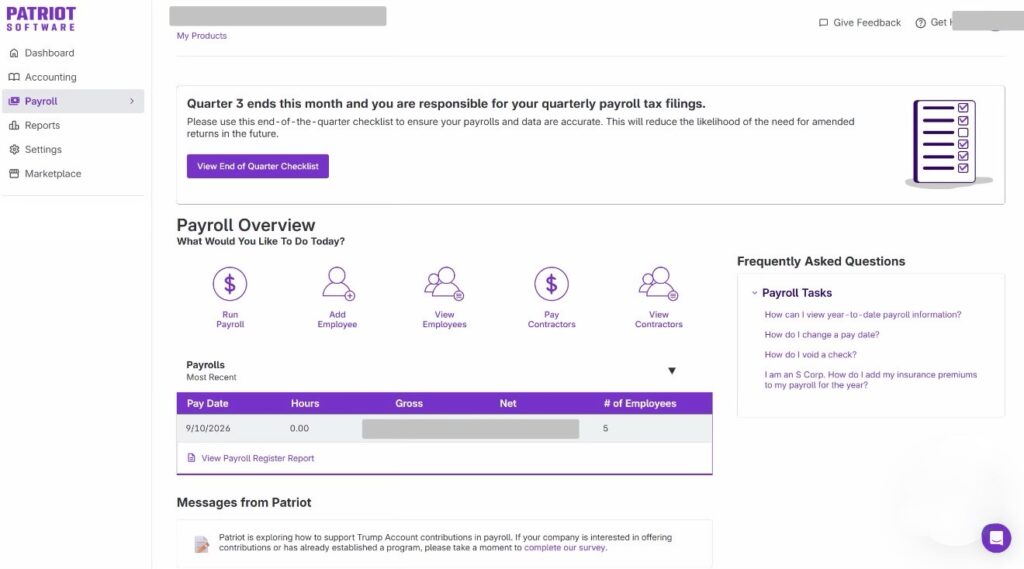
Our payroll setup isn’t particularly sophisticated.
Our employees clock in and out using a separate fingerprint timekeeping system.
At the end of the payroll period, we get each employee’s total hours from that system and manually enter those hours into Patriot.
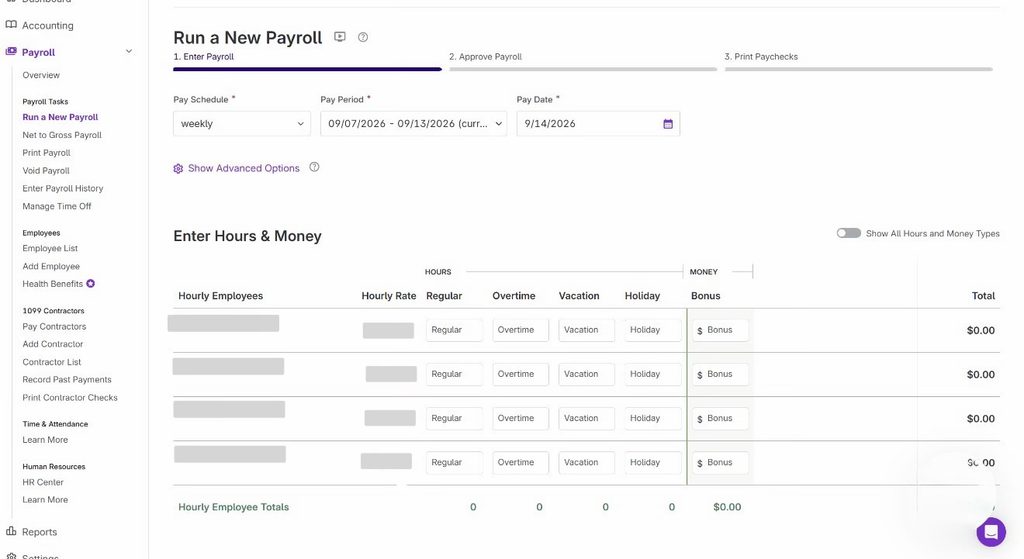
Patriot then calculates the payroll totals.
For employees receiving paper checks, we take the calculated net-pay amount and handwrite a check from our business account, just as we’ve done for years.
Patriot also includes direct deposit with its Basic Payroll plan. Patriot currently advertises free four-day direct deposit and faster two-day direct deposit for qualifying customers.
We pay weekly on Mondays, so employees who want direct deposit may have to work within the required processing timeline rather than receiving a handwritten check from us on Monday.
For now, we’re using Patriot only for our W-2 employees.
What We Like So Far
Again, we’re at the very beginning, so I’m not going to manufacture a list of ten “pros” after using the software for one day.
But several things already stand out.
The interface is simple and intuitive. The initial setup has been surprisingly easy. Patriot gives us the payroll calculations and reports we need without requiring us to buy a full-service payroll solution. And the pricing is substantially lower than what we had been paying.
Perhaps most importantly, we’re not paying for services we don’t currently need.
That’s really the reason Patriot makes sense for our small contracting business.
Basic Payroll vs. Full Service: Which Would We Choose?
For us today, Basic Payroll.
But that doesn’t mean I think every small contractor should make the same decision.
If the idea of calculating tax liabilities, making federal and state tax deposits and dealing with payroll tax filings makes you nervous, I’d seriously consider paying for Full Service Payroll.
Patriot’s current standard Full Service price is $37/month + $5 per worker paid, and it adds federal, state and local tax filings and deposits.
Even with nine employees, that’s not an enormous amount of money for transferring a significant administrative responsibility to somebody else.
Our situation is different because we’ve already been handling that responsibility ourselves for years.
It takes me roughly 20 minutes, I’m comfortable doing it, and I like maintaining control over the process.
Eventually, our answer could change.
If we grow substantially beyond nine employees, there will probably come a point where saving 20 minutes here and 20 minutes there stops being worth doing everything ourselves.
That’s one of the realities of growing a contracting business.
Sometimes paying someone else isn’t about whether you can do the job. It’s about whether it’s still the best use of your time.
What About QuickBooks?
I don’t want this article to come across as an anti-QuickBooks article, because it isn’t.
After approximately nine years of using QuickBooks Payroll, we switched because one particular change no longer fit our company’s preferred payroll process.
We’re still QuickBooks Online customers.
We use it extensively in our business, and separating payroll from accounting hasn’t changed that.
In fact, for a company that wants its payroll provider to handle tax filings and payments and likes having payroll closely tied to its accounting software, keeping everything within the QuickBooks ecosystem could make perfect sense.
That just wasn’t what we wanted.
For us, the better combination right now is:
QuickBooks Online for accounting.
Patriot Basic Payroll for payroll.
And our company handles its own payroll tax payments and filings.
Is Patriot Basic Payroll a Good Fit for Contractors?
Based on what we’ve seen so far, I think Patriot Basic Payroll is particularly interesting for a small contractor who:
- has a relatively small number of employees
- is comfortable handling payroll tax payments and filings
- wants straightforward payroll calculations and reporting
- doesn’t need an enormous HR/payroll platform
- wants to keep payroll costs relatively low
- doesn’t necessarily need payroll and accounting bundled together
If you want the payroll provider to take responsibility for tax filings and deposits, I’d look at Patriot Full Service instead of Basic.
And if having payroll fully integrated into your existing accounting ecosystem is your biggest priority, another provider could make more sense.
Payroll software isn’t something I’d choose based purely on which company has the longest feature list.
Choose the one that handles the jobs you actually need it to handle.
Our Verdict — For Now
So far, we’re happy with the switch.
But the words “so far” matter.
We’re currently running our first payroll with Patriot. It would be ridiculous for me to tell you this is the best payroll software we’ve ever used after one day.
What I can tell you is why we chose it.
After about nine years with QuickBooks Payroll, we wanted to go back to a simpler arrangement where the payroll software calculates payroll and provides the records, while we retain control over paying our employees and handling our payroll taxes.
Patriot Basic Payroll lets us do that.
The setup has been intuitive, the software appears straightforward, and based on our current employee count, our regular monthly software cost should be substantially lower than what we were paying.
For our nine-employee contracting business, Patriot makes sense because we’re not paying for services we don’t need.
We’ll update this review as we gain more experience with it.
Think Patriot Might Fit Your Business?
We chose Patriot because it gives our small contracting company the payroll tools we need without requiring us to pay for services we prefer to handle ourselves.
Put the Numbers to Work
Use our free contractor calculators to better understand labor costs, pricing, overhead, profit margins, and more.